
Largest Contentful Paint is often treated like a single website-speed number. Run a page through PageSpeed Insights, see a red LCP value, compress a few images, install another performance plugin, and hope the score turns green.
That approach sometimes works by accident. It is not a reliable optimization strategy.
LCP measures how long it takes the browser to render the largest visible image, text block, or video element in the initial viewport. A slow result may come from the server, a late-discovered hero image, a heavy resource, render-blocking CSS, JavaScript execution, or a web font. If you optimize the wrong part, the score may not move at all.
One of the most common mistakes is especially damaging: lazy-loading every image. Lazy loading is useful below the fold, but applying it to the LCP image delays the resource the browser needs most.
The practical rule for 2026 is:
Do not optimize “LCP” as one number. Identify the LCP element, break its timing into four subparts, and fix the largest delay.
What Is Largest Contentful Paint?
Largest Contentful Paint, or LCP, is one of Google’s three Core Web Vitals. It measures loading performance by recording when the largest eligible content element inside the viewport finishes rendering.
Eligible elements can include:
- an
<img>element; - an
<image>inside an SVG; - a video’s poster image or first presented frame;
- an element with a CSS
background-imageloaded throughurl(); - a block-level element containing text.
The browser may identify several LCP candidates while the page loads. A heading might be the largest element at first, then a hero image may replace it after rendering. The final candidate recorded before the user interacts becomes the page’s LCP entry.
According to Google’s current Core Web Vitals guidance, a good LCP should occur within 2.5 seconds for at least 75% of page visits, evaluated separately for mobile and desktop users.
| LCP result | Time |
|---|---|
| Good | 2.5 seconds or less |
| Needs improvement | More than 2.5 and up to 4.0 seconds |
| Poor | More than 4.0 seconds |
The 75th percentile matters. A fast test on a developer’s laptop does not compensate for a slow experience among real visitors using average phones, mobile networks, distant locations, or an uncached page.
Does LCP Affect Google Rankings?
Core Web Vitals are used by Google’s ranking systems, but LCP is not a shortcut to the top. Google warns that perfect technical scores do not guarantee rankings. Treat LCP primarily as a user-experience and conversion constraint: the goal is a fast, useful page, not a perfect score attached to a weak one.
Measure Field Data Before Fixing Anything
Before changing code, determine whether real users actually have an LCP problem.
Field Data
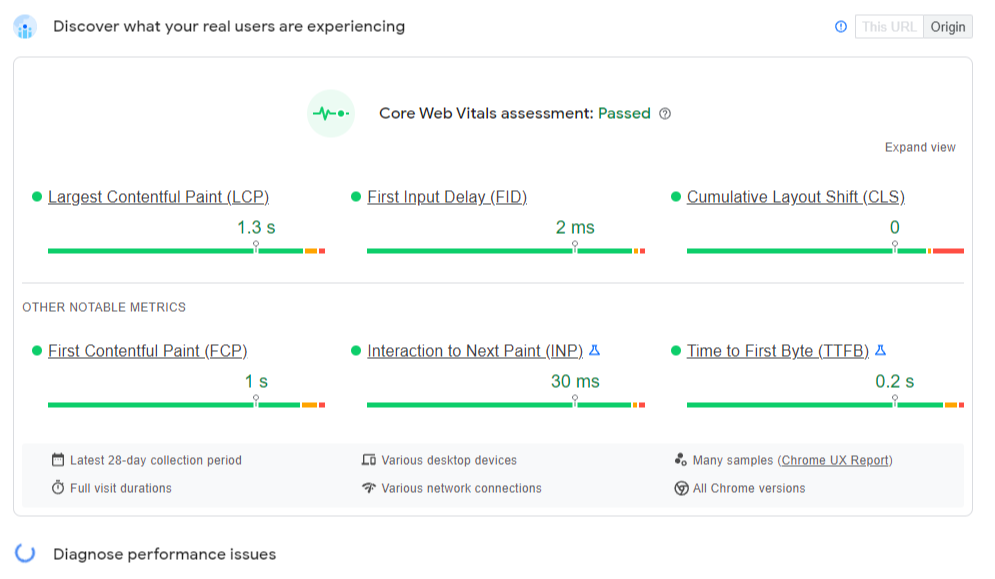
Field data comes from real visits with real devices and network conditions. The Chrome User Experience Report, or CrUX, powers the field section in PageSpeed Insights and the Core Web Vitals report in Search Console.
Use it to determine whether the issue is real, whether it affects mobile or desktop, and whether it belongs to one URL or an entire template group.
CrUX and Search Console use a rolling 28-day window. That means a production fix can improve laboratory tests immediately while the field result changes gradually as new visits replace older ones.
Lab Data
Lab tools simulate a page load under controlled conditions. PageSpeed Insights, Lighthouse, Chrome DevTools, and WebPageTest can show the LCP element, network waterfall, resource priority, main-thread activity, and render-blocking dependencies.
Use lab data to diagnose the cause. Do not confuse the Lighthouse performance score with the real-user Core Web Vitals assessment.
If lab and field data disagree, compare devices, locations, templates, cache states, consent banners, personalization, and third-party scripts. PageSpeed Insights may also show origin-level data when a URL lacks enough visits.
Find the Actual LCP Element
Do not assume the hero image is always the LCP element. It might be the main heading, a product image, a cookie banner, a carousel slide, a video poster, or even a large paragraph.
Use PageSpeed Insights or Lighthouse, then confirm the result in Chrome DevTools’ Performance panel. Test mobile and desktop, use a cold-cache navigation, and sample every major template rather than only the homepage.
The LCP candidate can change by viewport. A desktop hero image may be hidden on mobile, making a heading or product image the mobile LCP. Optimizing only the desktop element may therefore produce no improvement in the mobile field report.
Break LCP Into Four Subparts
Google’s current LCP optimization model divides the total time into four consecutive parts:
| LCP subpart | What it measures | Typical cause of a large value |
| Time to First Byte | Navigation start until the first byte of HTML arrives | Slow origin, redirects, no page cache, distant server |
| Resource load delay | First byte of HTML until the LCP resource starts loading | Lazy loading, CSS background, JavaScript injection, low priority |
| Resource load duration | Time spent downloading the LCP resource | Oversized image or font, slow host, network contention |
| Element render delay | Resource download completed until the element renders | Blocking CSS, JavaScript, fonts, animation, hidden content |
These parts add up to the full LCP time. Improving only image compression reduces resource load duration. It does not solve a two-second discovery delay or a hero that remains hidden until JavaScript initializes a slider.
This breakdown turns a vague red score into a concrete engineering decision.
How to Reduce Time to First Byte
The browser cannot discover or render the main content until it receives the HTML. A slow TTFB shifts every later step to the right.
Start by removing redirect chains such as http → https → www → localized URL. For public pages, full-page caching often produces a larger win than micro-optimizing application code; use explicit exceptions for logged-in users, carts, accounts, and personalized pages.
Profile slow database queries, external API calls, template rendering, middleware, and plugin hooks. Move nonessential work out of the request path, cache repeated results, and enforce timeouts on remote dependencies.
A CDN can reduce network distance and serve cached HTML or assets near users, but it cannot repair slow uncached code. Also enable text compression, reuse connections, and avoid unnecessary third-party origins for critical resources.
Eliminate LCP Resource Load Delay
Resource discovery is often the most overlooked part of LCP. The browser should see the critical resource in the initial HTML and start loading it immediately.
Do Not Lazy-Load the LCP Image
This is the most important correction to the original version of this article.
Do not use this for an above-the-fold LCP image:
<img src="/hero.webp" loading="lazy" alt="Product dashboard">Use an ordinary eager image and, when testing confirms it is the LCP resource, give it high fetch priority:
<img
  src="/hero-1280.avif"
  srcset="/hero-640.avif 640w, /hero-1280.avif 1280w"
  sizes="100vw"
  width="1280"
  height="720"
  fetchpriority="high"
  decoding="async"
  alt="Product dashboard"
>
Chrome’s current LCP discovery guidance recommends three things for an image LCP: make it discoverable in the original HTML, prioritize it, and avoid lazy loading.
Use fetchpriority="high" sparingly. Marking five images as high priority means none of them is meaningfully prioritized and can delay other critical resources.
Prefer HTML Images Over CSS Backgrounds
A hero referenced only inside an external stylesheet cannot be discovered until the CSS downloads and is parsed. When the image is meaningful content, an <img> or <picture> element is usually the better choice.
If a CSS background must remain the LCP resource, preload the exact responsive asset the browser will use:
<link
  rel="preload"
  as="image"
  href="/hero.avif"
  type="image/avif"
  fetchpriority="high"
>
Do not preload a desktop hero that mobile CSS replaces with a different file. Incorrect preloads consume bandwidth without helping the visible element.
Put the LCP Element in the Server HTML
A hero or heading injected after a JavaScript bundle loads creates avoidable delay. Render essential above-the-fold content in the initial HTML through server-side rendering, static generation, or prerendering.
Hydration can add interactivity later. It should not be required for the browser to discover the main image or basic text.
Preconnect Only to Critical Origins
If the LCP resource must come from a different hostname, a targeted preconnect can start DNS, TCP, and TLS work earlier. Too many preconnect hints waste sockets and processing, so reserve them for origins required during the critical path.
Reduce LCP Resource Load Duration
Once the browser starts the resource promptly, reduce the bytes and transfer time.
Do not send a 4,000-pixel photograph into a 1,000-pixel container. Generate responsive variants and use srcset and sizes. Correct dimensions often matter more than format: a properly sized JPEG can outperform an enormous AVIF.
Use AVIF or WebP where they provide a meaningful saving, and <picture> when different formats or crops are genuinely needed. Remove metadata and tune compression for the asset; screenshots with small text require different settings than photographs.
Reduce Bandwidth Competition
Third-party scripts, multiple web fonts, auto-playing video, hidden carousel slides, and noncritical images can compete with the LCP resource. Defer or deprioritize them. A small LCP image can still load slowly when ten other high-priority requests start at the same time.
Finally, version static filenames and give images, fonts, CSS, and JavaScript long-lived cache headers so repeat visitors do not download unchanged assets again.
Reduce Element Render Delay
Sometimes the LCP resource downloads quickly but sits unused while the page waits for CSS, fonts, JavaScript, or an animation.
Reduce Render-Blocking CSS
Ship only the styles required to render the initial viewport early. Remove unused framework CSS, split template-specific styles, minify the result, and load noncritical styles later.
Inlining a small amount of critical CSS can remove a network request, but inlining a large stylesheet bloats every HTML response and prevents shared caching. Measure the trade-off.
Defer Noncritical JavaScript
Avoid synchronous scripts in the document head unless they are tiny and genuinely required before first render. Use defer, async, or module loading appropriately, split large bundles, and delay analytics, chat widgets, heatmaps, and recommendation engines when they do not need to block the initial experience.
Downloading JavaScript is only part of the cost. Parsing and executing a large bundle can block the main thread after the LCP image has already arrived.
Do Not Hide the Hero Until Initialization
Sliders and animation libraries often apply opacity: 0, skeleton layers, or hidden containers until JavaScript starts. The resource may finish downloading while the actual LCP element remains invisible.
Render the first slide or hero as normal HTML and CSS. Enhance it after first paint. Avoid entrance animations on the main content when they postpone visibility.
Optimize Text LCP and Fonts
When a heading or paragraph is the LCP element, a web font can become the bottleneck. Subset font files, use WOFF2, limit families and weights, preload only the font needed above the fold, and choose an appropriate font-display strategy.
A system-font fallback is the fastest option. When brand typography is essential, make the fallback metrics similar to the final font to reduce layout shifts and visually disruptive swaps.
How to Improve LCP on WordPress
WordPress performance advice is often reduced to “install a cache plugin.” A plugin can help, but LCP still follows the same four-part model.
Start With the Current WordPress Core
Since WordPress 6.3, core automatically attempts to add fetchpriority="high" to the image most likely to become the LCP element and avoids lazy-loading likely above-the-fold images. Later releases continued refining loading optimization.
That does not make the result infallible. Theme builders, custom templates, optimization plugins, sliders, and image-CDN plugins can replace markup or apply their own loading attributes. Inspect the final HTML received by an anonymous visitor.
Confirm that:
- the real LCP image does not contain
loading="lazy"; - no image has both
loading="lazy"andfetchpriority="high"; - only the intended critical image receives high priority;
- the correct
srcsetandsizesvalues are present; - the hero is visible without waiting for a slider script;
- plugins have not added duplicate preloads.
Improve WordPress TTFB
Use full-page caching for public traffic, object caching where it improves repeated database work, an up-to-date PHP version, and hosting that can handle uncached requests. Remove or replace plugins that execute expensive queries or remote requests on every page.
The number of installed plugins is less important than what they do. One poorly designed plugin can be slower than twenty small ones.
Load Assets Per Template
Do not enqueue gallery, form, slider, shop, and page-builder assets across the entire site when only one template needs them. Audit unused CSS and JavaScript at the page level.
Check Optimization Plugin Conflicts
Combining several cache and optimization plugins can create duplicate minification, broken preload rules, delayed first-party scripts, or an LCP image mistakenly rewritten as lazy. Use one clear owner for each function: page caching, CDN, image transformation, CSS optimization, and script delay.
Common LCP Optimization Mistakes
- Lazy-loading everything: defer below-the-fold media, not the content required in the first viewport.
- Preloading everything: preload is a priority instruction; excessive hints steal bandwidth from critical resources.
- Compressing the hero and stopping: saving 40 KB barely matters if discovery or rendering is two seconds late.
- Chasing a Lighthouse score of 100: optimize the field distribution and user journey, not a report screenshot.
- Testing only the homepage: product, article, category, landing, and checkout templates have different bottlenecks.
- Ignoring consent and third-party UI: a cookie dialog, ad, or banner can become the LCP candidate or delay it.
A Practical LCP Decision Table
| What you observe | Likely bottleneck | First action |
| HTML arrives late | TTFB | Add full-page caching and profile backend work |
| Hero request starts long after HTML | Resource load delay | Put it in HTML, remove lazy loading, verify priority |
| Hero starts early but downloads slowly | Resource load duration | Resize, compress, use responsive formats and CDN |
| Image downloads but appears much later | Render delay | Audit CSS, JavaScript, slider initialization, and main-thread work |
| Heading is LCP and appears late | Font or render delay | Reduce fonts, preload one critical font, improve fallback strategy |
| Mobile fails while desktop passes | Responsive element or delivery | Inspect the mobile LCP candidate and mobile image selection |
| Lighthouse passes but Search Console fails | Field conditions | Compare CrUX devices, templates, cache states, and real-user scripts |
Validate the Fix Properly
Use a two-speed validation process.
Immediately After Deployment
- Test several cold-cache runs in DevTools, Lighthouse, or WebPageTest.
- Confirm the intended LCP element on mobile and desktop.
- Inspect the network waterfall and resource priority.
- Verify that the LCP image is discoverable in the initial HTML.
- Check that it is not lazy-loaded and that unrelated resources are not marked high priority.
- Test key templates, not one URL.
- Watch for regressions in INP and CLS; an LCP improvement that breaks interactivity or layout stability is not a successful release.
Over the Following Weeks
Monitor RUM, PageSpeed Insights field data, CrUX, and Search Console. Because these reports aggregate a rolling 28-day period, expect the public field result to move gradually.
Record the deployment date and compare the distribution rather than one daily number. If the site has too little traffic for URL-level CrUX data, use your own Real User Monitoring with the web-vitals library and segment results by template, device, connection, country, and release version.
Frequently Asked Questions
What Is a Good LCP Score?
A good LCP is 2.5 seconds or less at the 75th percentile of real page visits, evaluated separately for mobile and desktop. Between 2.5 and 4.0 seconds needs improvement; above 4.0 seconds is poor.
Should the LCP Image Be Lazy-Loaded?
No. An above-the-fold LCP image should be discoverable immediately and loaded eagerly. Use lazy loading for images outside the initial viewport.
Does fetchpriority="high" Improve LCP?
It can reduce resource load delay when applied to the actual LCP image. It will not repair slow TTFB, a huge file, blocking CSS, or JavaScript-controlled visibility. Use it on one critical image, not every image near the top of the document.
Should the LCP Image Be Preloaded?
Preload it when the browser cannot discover it early enough—for example, when it must remain a CSS background or comes from markup discovered late. An ordinary <img> in the initial HTML with high fetch priority may already start early enough, making an extra preload redundant.
Why Is LCP Different on Mobile and Desktop?
The viewport, network, CPU, responsive layout, selected image file, and even the largest visible element may differ. Always diagnose each form factor separately.
How Long Does It Take Search Console to Show an Improvement?
Lab tools can reflect the change immediately. CrUX-based field reports use a rolling 28-day window, so older visits are replaced gradually. Search Console validation also needs enough eligible real-user data.
Final Checklist
- Measure real-user LCP at the 75th percentile.
- Identify the actual LCP element on mobile and desktop.
- Break the timing into TTFB, load delay, load duration, and render delay.
- Make the LCP resource discoverable in the initial HTML.
- Never lazy-load the LCP image.
- Apply high fetch priority only to the genuine critical image.
- Resize, compress, and deliver responsive images.
- Reduce blocking CSS, JavaScript, fonts, and main-thread work.
- Cache public HTML and profile slow backend requests.
- Validate every major template and monitor field data after release.
Conclusion
The fastest route to a better Largest Contentful Paint is not another generic optimization checklist. It is a correct diagnosis.
Find the element. Find the dominant subpart. Then fix the specific delay: the server, discovery, transfer, or rendering.
That approach is less glamorous than installing a speed plugin and watching an animated progress bar. It is also far more likely to survive the next theme update, framework migration, marketing script, or infrastructure change.
LCP is not one problem. Treating it as one is the problem.
1 thought on “How to Improve Largest Contentful Paint (LCP) in 2026”